Full‑size GPU over TB5/TB4 — powerful and modular, but bulky and not Apple‑Silicon friendly
Quick Answer
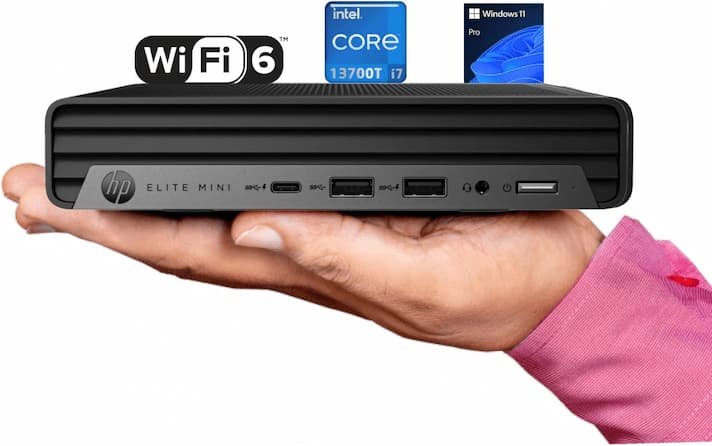
The Razer Core X V2 eGPU enclosure enables connecting a desktop GPU to a mini PC via Thunderbolt 4. Performance depends heavily on Thunderbolt bandwidth — expect 70–80% of native PCIe GPU performance. Compatible mini PCs include ASUS NUC, Geekom, and others with Thunderbolt 4. At ~£200 for the enclosure plus GPU cost, eGPU setups are a niche but viable solution for gaming on a developer mini PC.
Mobility often means compromise: most laptops throttle under sustained GPU loads, leaving creators and gamers stuck with reduced frame rates, slower renders, or interrupted compute jobs. They need a way to add desktop‑class GPU power without abandoning their thin-and-light workflow.
📋 Free: Mini PC Buying CheatsheetThe 7-question framework we use to pick the right mini PC. Instant download.
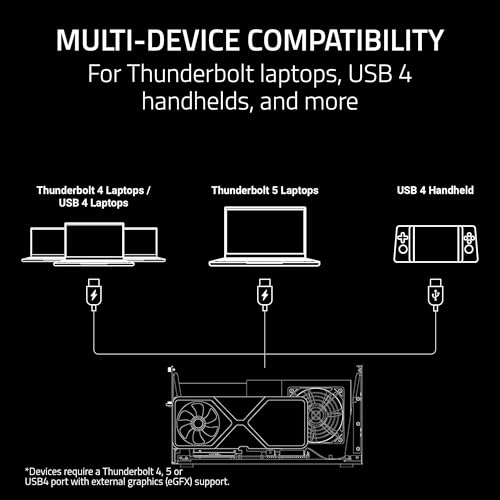
The Razer Core X V2 eGPU bridges that gap by exposing a full‑length, 4‑slot desktop GPU to Thunderbolt 4/5 and USB4 hosts, with ATX PSU support and 140W PD over USB‑C. It’s a modular, tool‑free enclosure with active cooling and Synapse controls — but it requires a separate GPU and PSU and isn’t supported on Apple Silicon. This review walks through the hero features, a quick summary, a technical breakdown, real‑world use cases, pros/cons, and a final verdict, with objective comparisons to more compact eGPU alternatives.
The Blackmagic eGPU Pro is designed for powerful graphics performance, making it ideal for professional video editing and 3D rendering. With a comprehensive refurbishment process, it ensures both functionality and aesthetic appeal for a premium experience.
Best for Boosting Laptop Graphics with Desktop GPUs
8.6/10
URIVIO Score
A high-performance, modular eGPU enclosure that gives laptops and USB4 devices a near-desktop GPU experience while maintaining upgrade flexibility. It balances modern Thunderbolt 5 bandwidth and practical engineering for sustained loads, though buyers must budget separately for a power supply and GPU.
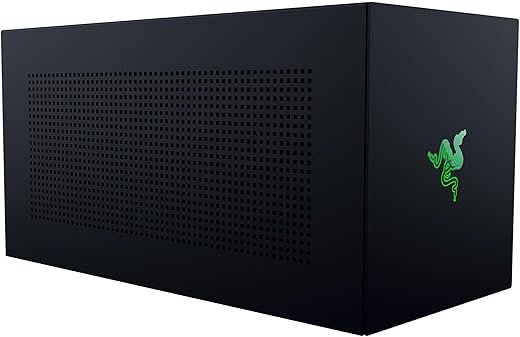
The Razer Core X V2 presents itself as a workstation-grade external GPU enclosure engineered for professionals and serious gamers who need desktop GPU performance on a laptop or compatible handheld. It targets users who want to swap GPUs and PSUs over time rather than replacing an entire chassis: the enclosure is built to accept full-size, multi-slot desktop graphics cards and standard ATX power supplies while exposing modern host connectivity through Thunderbolt 5, Thunderbolt 4, and USB4.
Trending Now
4K Mini DisplayPort to HDMI Cable
Enjoy High-Quality 3D Video Streaming
This Mini DisplayPort to HDMI cable offers stunning 4K video output, perfect for MacBook users wanting to connect to HDMI displays for a rich visual experience.
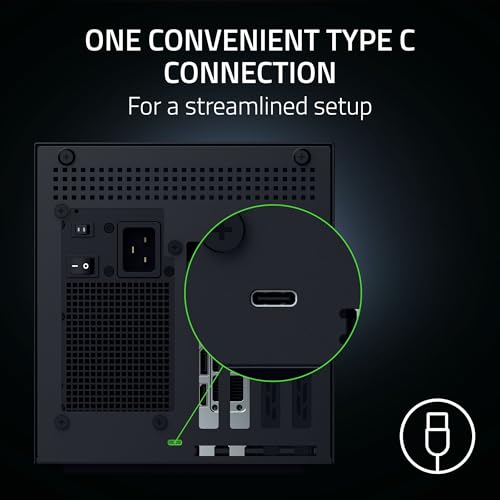
At its core the Core X V2 is a purpose-driven chassis: a steel, vented enclosure with a 120 mm active cooling fan, a single high-speed host cable, and a flexible internal mounting system. The focus is on real-world performance: it prioritizes PCIe x16 signal integrity, thermal staging for prolonged GPU loads, and a 140W USB-C power delivery channel to top up compatible laptops. It is not a plug-and-play replacement for an internal GPU but rather a modular bridge between a laptop and a desktop GPU ecosystem.
Technical Breakdown
The technical architecture is straightforward but thoughtfully implemented to maximize compatibility and performance.
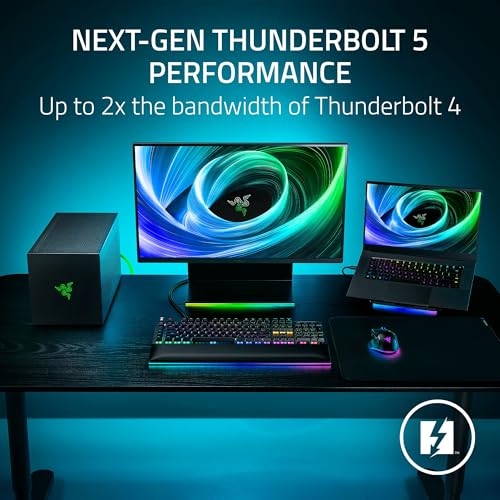
Host Interface: Thunderbolt 5 (backwards compatible with Thunderbolt 4/USB4) offering up to 80 Gbps raw bandwidth. This makes it a forward-looking choice for machines that include TB5 silicon, while remaining useful for TB4 and USB4 hosts.
PCIe Support: Designed to carry PCIe Gen 4-class GPUs; the internal riser and connector prioritize an x16 lane implementation when paired with compatible hosts and drivers.
Power Delivery: Up to 140W PD via the included USB-C cable to charge compatible laptops while the GPU is in use—useful for many high-end Ultrabooks and creator laptops that accept 100–140W PD input.
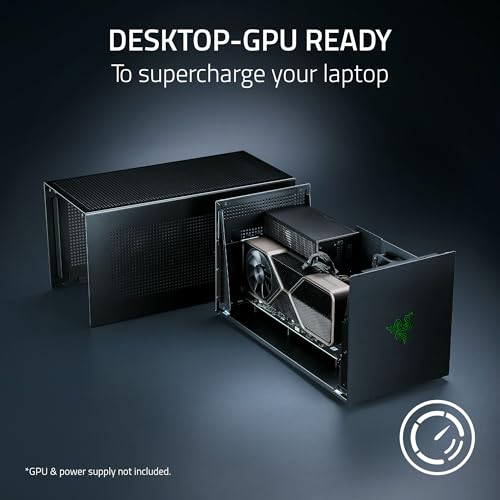
GPU & PSU Accommodation: Fits full-length, up to 4-slot wide desktop GPUs and standard ATX power supplies, enabling high-wattage cards with significant TDPs.
Cooling: A 120 mm intake/exhaust fan with automatic speed control adjusts to chassis temperature; Razer Synapse can be used by those on supported platforms to customize fan curves.
Technical specification snapshot (concise):
Item
Key Detail
Host Interface
Thunderbolt 5 (80 Gbps), backwards to TB4 / USB4
PCIe
PCIe Gen4-capable 4-slot x16 riser
Power Delivery
Up to 140W via USB-C to host
Cooling
120 mm fan, auto and Synapse-configurable
Physical Size
~16.6 x 7.8 x 8.5 inches; sturdy steel body
Installation & Setup Notes
Install a full-size GPU and a compatible ATX PSU using the provided thumbscrews and tool-free tray system. The enclosure is not sold with a graphics card or power supply, so the buyer must select components that physically and electrically match the enclosure’s footprint.
Connect the included Thunderbolt 5 cable to a host that supports TB5, TB4, or USB4. For optimal performance—especially for GPU-limited workloads—attach the external monitor directly to the discrete GPU outputs rather than relying on internal display passthrough.
Update the host’s Thunderbolt firmware and the GPU drivers to the latest versions to maximize compatibility and stability across Windows 11 systems.
Hot Pick
Syscooling Full Cover GPU Water Block
Optimized for RTX 2080 and 2080Ti
This full-cover water block efficiently cools your high-performance RTX 2080 or 2080Ti graphics card, ensuring optimal performance and longevity for your gaming rig.
The Core X V2 is tuned for sustained workloads. The 120 mm fan provides adequate airflow for most high-wattage cards when paired with a well-ventilated PSU and case layout. Thermal performance will depend primarily on the installed GPU’s cooler and the chosen PSU.
Must-Have
BTI 230W Charger for Razer Blade Series
Compatible with multiple Razer models
This 230W adapter is specifically designed for Razer Blade laptops, providing reliable power and performance. It ensures your laptop stays charged, tackling demanding tasks with ease.
Under heavy GPU load the fan ramps up predictably to maintain safe chassis temperatures.
Noise is moderate: the 120 mm fan has lower RPM at idle but becomes audible during extended stress tests. Synapse control helps balance acoustics versus cooling for workstation environments.
Real-World Use Cases
Content Creation: Photo, video editing, and 3D rendering take clear advantage of the eGPU’s dedicated compute resources. Applications that support external GPUs (CUDA, OpenCL, Vulkan-aware apps) see the biggest gains when the software is configured to use the dGPU and external displays are connected to the GPU outputs.
Gaming: When paired with a gaming laptop the Core X V2 unlocks desktop-class framerates on AAA titles—particularly when the display is attached to the external GPU. Users should expect slightly reduced peak bandwidth compared to a native desktop PCIe slot (typical Thunderbolt overhead), but performance remains competitive for most titles.
GPU-accelerated Machine Learning & Simulation: For developers who need Tensor cores or high VRAM capacity temporarily on a portable platform, the enclosure provides a cost-effective way to attach compute-heavy cards without a full desktop.
Upgrade Path & Longevity
A core advantage is upgradeability. The enclosure’s support for ATX PSUs and full-size GPUs means the chassis can host new generations of cards as they become available—invest once in the enclosure and swap GPUs as workload needs evolve. Compared to closed, integrated eGPUs, the Core X V2 reduces long-term total cost of ownership for users who will periodically upgrade GPUs.
Side-by-Side Comparison (objective)
Factor
Razer Core X V2
Compact Single-Bay eGPU
Integrated Dock Solutions
GPU Size Support
Up to 4-slot desktop GPUs
Usually single-slot or dual-slot only
Varies; often limited
PSU Flexibility
Any standard ATX PSU
Internal, fixed power
Fixed wattage, non-upgradeable
Bandwidth
TB5 (80 Gbps)
TB4 or older
Usually TB4/TB3
Portability
Low (larger)
Higher (smaller)
Mixed
This comparison underlines the Core X V2’s place as a modular, upgrade-first solution rather than the most compact option for travelers.
Must-Have
Razer Core X eGPU Enclosure Thunderbolt 3
Designed for External Graphics Processing
The Razer Core X allows you to connect a desktop GPU to your laptop via Thunderbolt 3, enhancing your gaming and rendering performance significantly while maintaining optimal temperatures.
Strengths: modularity, TB5-ready bandwidth, 140W PD, ventilation and thermal headroom for large cards.
Trade-offs: size/weight, requirement to buy GPU and PSU separately, and Apple Silicon lack of eGPU support.
Final Verdict
For professionals and demanding gamers who need a durable, upgradeable external GPU platform the enclosure offers a compelling mix of performance and flexibility. It particularly suits buyers who plan to iterate on GPUs over multiple years and those who want to transfer desktop graphics power to a portable system on demand. The primary caveats are the additional component purchases (GPU + PSU) and the physical footprint, which make it a better fit for semi-permanent workstation setups than purely mobile users.
Hot Pick
ASUS TUF Gaming GeForce RTX 5080 Card
Durable Design with Overclocked Performance
The ASUS TUF RTX 5080 features military-grade components and 16GB of GDDR7 memory, delivering exceptional performance for both gaming and creative applications with long-lasting reliability.
In short, the Core X V2 is a technical, forward-compatible bridge between laptop convenience and desktop-class GPU performance—especially valuable where PCIe Gen4 GPU capability and TB5 bandwidth matter most.
Razer Core X V2 External GPU Enclosure
Best for Boosting Laptop Graphics with Desktop GPUs
Will this eGPU make my laptop run games like a desktop?
It will get much closer to desktop GPU performance, particularly when the external monitor is connected to the graphics card outputs. However, because Thunderbolt still introduces an interface overhead versus a native PCIe x16 slot, peak performance may be slightly lower than an internal desktop GPU. Real-world results depend on the GPU chosen, host CPU, and whether the laptop’s CPU becomes a bottleneck.
Can any PCIe desktop GPU be installed in the Core X V2?
Most full-length desktop GPUs that physically fit within a 4-slot width will work. Buyers should verify card length, width, cooler profile, and power connector requirements. Because the enclosure uses a standard ATX PSU, it can supply high TDP cards as long as the chosen PSU has adequate wattage and connectors.
Does the 140W power delivery charge every laptop at full speed?
The 140W PD is useful for many high-performance laptops, but actual charging behavior depends on the laptop manufacturer’s PD implementation. Some gaming laptops require vendor-specific chargers for full power and may only accept lower PD levels from USB-C. Always verify the laptop’s PD acceptance specifications.
Is macOS supported with this enclosure?
Apple Silicon Macs (M1 and later) do not support external GPUs, so the enclosure cannot provide eGPU functionality to those systems. Intel-based Macs with Thunderbolt 3 historically supported eGPUs, but driver and OS compatibility issues make Windows 11 on TB4/TB5 hosts the primary supported scenario.
How noisy will the setup be under heavy load?
Noise comes from the GPU cooler, the chosen ATX PSU, and the enclosure’s 120 mm fan. For quiet setups, choose a GPU with a quieter cooler and a high-quality, low-noise PSU. The enclosure fan ramps with temperature—use Synapse to fine-tune if the host is supported.
What’s the best way to maximize performance with this eGPU?
Connect an external display to the GPU, update Thunderbolt firmware and GPU drivers, use a high-bandwidth TB5 or TB4 host, and ensure the laptop’s CPU is capable enough to avoid becoming the system bottleneck. Choosing a GPU that fits the workload (VR, 4K editing, ML compute) will yield the biggest practical gains.
{“@context”:”https://schema.org”,”@type”:”Product”,”name”:”Razer Core X V2 External GPU Enclosure”,”image”:”https://m.media-amazon.com/images/I/61t5oZklfBL._AC_SL520_.jpg”,”asin”:”B0FFQFDZWX”,”review”:{“@type”:”Review”,”name”:”Razer Core X V2 eGPU — Turn Your Laptop into a Desktop GPU Beast”,”reviewBody”:”A high-performance, modular eGPU enclosure that gives laptops and USB4 devices a near-desktop GPU experience while maintaining upgrade flexibility. It balances modern Thunderbolt 5 bandwidth and practical engineering for sustained loads, though buyers must budget separately for a power supply and GPU.”,”reviewRating”:{“@type”:”Rating”,”ratingValue”:”8.6″,”bestRating”:”10″},”datePublished”:”2026-02-27″,”positiveNotes”:{“@type”:”ItemList”,”itemListElement”:[{“@type”:”ListItem”,”position”:1,”name”:”Thunderbolt 5-ready with up to 80 Gbps bandwidth and 140W PD”},{“@type”:”ListItem”,”position”:2,”name”:”Supports full-length, 4-slot desktop NVIDIA/AMD GPUs and standard ATX PSUs”},{“@type”:”ListItem”,”position”:3,”name”:”Tool-free, modular installation with adjustable internal layout”},{“@type”:”ListItem”,”position”:4,”name”:”Active 120 mm cooling with configurable fan profiles via Synapse”},{“@type”:”ListItem”,”position”:5,”name”:”Broad Windows and USB4 device compatibility for gaming and content creation”},{“@type”:”ListItem”,”position”:6,”name”:”Robust, vented steel chassis built for long-term GPU upgrades”}]},”negativeNotes”:{“@type”:”ItemList”,”itemListElement”:[{“@type”:”ListItem”,”position”:1,”name”:”Requires separate GPU and ATX power supply (sold separately)”},{“@type”:”ListItem”,”position”:2,”name”:”Not supported on Macs with Apple Silicon (M1 and later)”},{“@type”:”ListItem”,”position”:3,”name”:”Relatively large and heavy compared with compact eGPU alternatives”}]},”author”:{“@type”:”Person”,”name”:”Urivio”,”url”:”https://urivio.com/author/urivio/”}}}
The Lenovo ThinkPad X1 Yoga combines versatility with performance, featuring a 14-inch UHD touchscreen and Thunderbolt 3 capabilities, perfect for business and multitasking.