How well does the Beelink Mini S12 16GB/500GB perform for everyday desktop tasks?

Deal Score+1
£47.89
£47.89
Quick Answer
The Beelink Mini S12 Pro (Intel N100, 16GB, 500GB NVMe, ~£165) is the definitive budget mini PC in 2026. It handles 4K streaming, video calls, web browsing, and light productivity without issue. The 2.5GbE ethernet and dual HDMI outputs are genuine highlights at this price. Not suitable for gaming or sustained heavy workloads.
beelink mini s12 pro
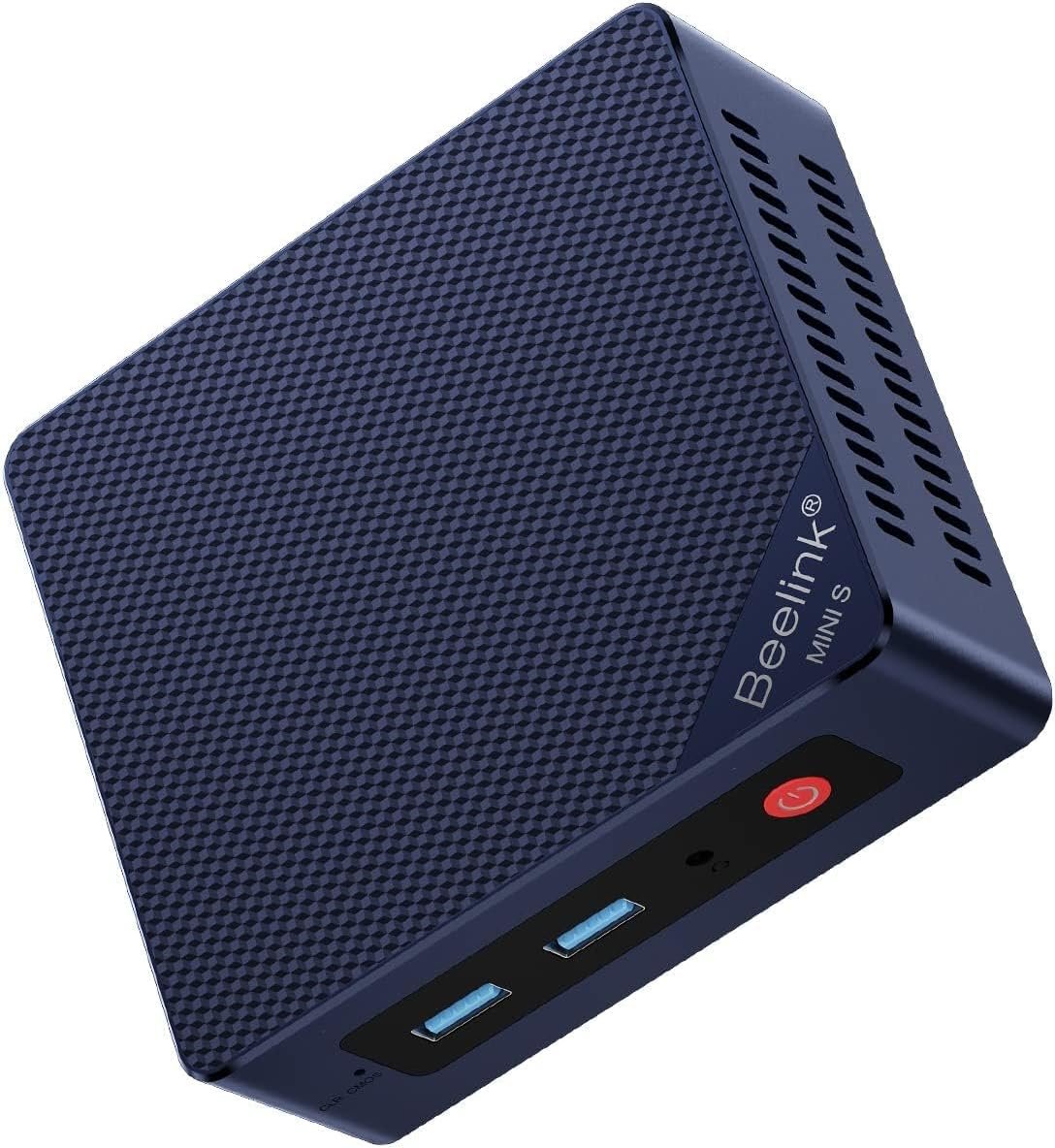
Beelink Mini S12 Intel 12th Gen PC is one of the most searched compact computing solutions right now. Below is a clear, technical breakdown to help you decide if it fits your workflow. Quick Answer The Beelink Mini S12 is a compact desktop PC that pairs an Intel N95 4‑core processor (up to 3.4 GHz) with 16 GB DDR4 RAM and a 500 GB SSD. At a glance it targets users who want a small, low‑power machine for web browsing, office work, video calls, media playback and light creative work. Below I break down how it performs for common everyday tasks, what to expect, and practical tips if you’re considering one.Key specs that matter for everyday use
- CPU: Intel N95 (4 cores, up to 3.4 GHz) — energy efficient, modest multi‑core performance
- RAM: 16 GB DDR4 (3000 MHz listed) — plenty for multitasking and browser-heavy workloads
- Storage: 500 GB SSD — fast OS and app responsiveness, good for general storage
- Graphics: Integrated Intel UHD Graphics — fine for 2D desktop work and HD/4K video playback
- Video outputs: Dual HDMI supporting up to 3840×2160 @60Hz — great for dual‑monitor productivity
- Connectivity: 2.5 Gbps Ethernet, Wi‑Fi 802.11ac (Dual band), Bluetooth 4.2
- I/O: Multiple USB 3.2 Gen2 ports (10 Gbps), audio jack, VESA mount included
- Cooling: active fan + heatsink — helps sustained responsiveness under load
- OS: Windows 11 variants available (package may vary by seller)
Real-world performance — task by task
Web browsing and email
- Excellent: With 16 GB of RAM the S12 handles multiple browser tabs, web apps and video calls smoothly in normal use.
- Notes: Heavy tab sprawl with many video streams and multiple VMs will push the CPU and single integrated GPU, but everyday browsing and web apps are responsive.
Office productivity (Word, Excel, PowerPoint)
- Very good: Office suites, spreadsheets and PDF work are handled comfortably.
- Multiprocessing tip: Large spreadsheets with complex calculations will be slower than on high‑end CPUs, but acceptable for typical office workloads.
Video calls (Zoom, Teams, Skype)
- Good: The CPU and networking are well suited for 720p/1080p video calls. Users report smooth Zoom/Skype performance for meetings.
- Recommendation: Use wired Ethernet for the most stable call quality, especially when also streaming or multitasking.
Media playback and dual‑monitor usage
- Excellent for streaming: Dual HDMI 4K@60Hz outputs and Intel integrated graphics handle 4K video playback and desktop use well.
- Light media editing is possible, but heavy 4K encoding will be slow compared with dedicated CPUs/GPUs.
Light photo editing and casual creative apps
- Capable: Tasks like photo adjustments, light Photoshop work, and non‑real‑time editing work fine.
- Limits: Large multi‑layer edits or heavy brushes/filters will be slower than on more powerful desktop CPUs.
Gaming and emulation
- Light gaming: Older or less demanding titles and emulators run fine at lower resolutions (720p/1080p). Several reviewers reported playable experiences with older games.
- Not for modern AAA gaming: Integrated graphics and low TDP limit performance for modern, demanding games.
Thermals, noise and reliability
- Thermals: Reviewers have reported temperatures up to ~70–80°C under heavier sustained workloads — expected for a small fan‑cooled chassis.
- Noise: Opinions vary — some find the fan quiet, others report it runs more frequently. Placement (behind monitor vs on desk) affects perceived noise.
- Longevity: Built‑in cooling, a metal chassis and accessible internals (for upgrades) are positive signs for durability if you maintain ventilation.
Connectivity, expandability and practical points
- Networking: 2.5 Gbps Ethernet is a strong point — use wired for highest performance. Wi‑Fi 5 (802.11ac) works but a few users reported weaker Wi‑Fi in some units; Ethernet avoids that.
- Ports: Multiple USB3.2 Gen2 ports and dual HDMI are convenient for peripherals and multi‑monitor setups.
- Upgrade options: Users report easy access to RAM and storage — you can add/replace SSDs and increase RAM configuration if needed.
- Power and efficiency: Low power draw makes it an economical 24/7 desktop or HTPC option.
Pros and cons (summary)
Pros
- Small form factor with VESA mount — saves desk space.
- 16 GB RAM + 500 GB SSD gives snappy OS/app feel for everyday tasks.
- Dual 4K HDMI outputs ideal for productivity and media.
- 2.5 Gbps Ethernet and multiple fast USB ports.
- Low power consumption and reasonable cooling for typical desktop loads.
Cons
- Not designed for heavy gaming or professional video editing workloads.
- Some units may show Wi‑Fi signal or driver quirks — wired connection recommended for reliability.
- Fan behavior varies by unit; can run continually under load and be noticeable in quiet environments.
- Performance is limited by integrated graphics and modest CPU compared with full‑size desktops.
Who should buy the Mini S12?
- Home users who need a compact, low‑power PC for browsing, streaming, office apps and video calls.
- Small office or classroom setups where space and power efficiency matter.
- Anyone who wants a dual‑4K output mini‑PC for productivity or as an HTPC.
- Not recommended as the primary machine for heavy gaming, large‑scale video editing, or CPU/GPU‑intensive production work.
Tips to get the best everyday experience
- Prefer a wired Ethernet connection when doing video calls, large file transfers or VPN work.
- Keep ventilation clear and consider elevated placement to help cooling under load.
- If you plan heavier multitasking, ensure the machine is configured with dual‑channel RAM when possible (some reviewers noted gains after upgrading RAM).
- Check for and install Windows and driver updates after first boot to avoid driver‑related quirks.
- Consider adding a secondary SSD/HDD if you need more storage for media and files.
Verdict
For everyday desktop tasks — web browsing, office productivity, video calls, and media playback — the Beelink Mini S12 with 16 GB RAM and a 500 GB SSD performs very well. It offers a highly usable, compact desktop experience with the convenience of dual 4K outputs and fast wired networking. If your workload is typical home/office use or light creative tasks, it’s a solid, efficient choice. If you need heavy gaming, serious video editing or sustained high compute workloads, a larger desktop with a stronger CPU/GPU would be a better fit. Price listed in the product data: $319 (may vary by seller and region). Key Features Performance & Real-World UseIs Beelink Mini S12 Intel 12th Gen PC Worth It?
Who Should Buy This? The Beelink Mini S12 is a compact mini‑PC built around Intel 12th‑Gen (Alder Lake) processors. It delivers solid CPU performance for multitasking, office productivity, web browsing, 4K media playback and light photo/video editing. Performance: improves single‑ and multi‑threaded performance over many older low‑power mini‑PCs due to Alder Lake cores. Use case: suited for home/office work, media center/HTPC, light creative tasks and small home‑lab servers. Limitation: integrated Intel graphics limit gaming and GPU‑heavy work, the small chassis can throttle under sustained heavy loads, and internal upgradeability is often limited. Compare Prices & Offers
Final Verdict
If you want the best current deal and availability, check the latest offers below.
 Walmart.com
  eBay
eBay 
Beelink Mini PC, Mini S13 Pro Mini Computer Intel Twin Lake N150(up to 3.6GHz), Desktop Computers 16G DDR4 RAM 500G PCIe3.0 SSD, Small PC 4K UHD Dual...
$439.90
in stock
Walmart.com

Beelink Mate Mini S Docking Station for Beelink Mini S Mini S12 Pro Mini S13 Min
£47.89
out of stock
eBay
Mini PC, Beelink MINI-S12 mini pc, 12th generation processor N95 Mini PC (up to
£298.36
out of stock
eBay

This page contains affiliate links. We may earn a commission at no extra cost to you.