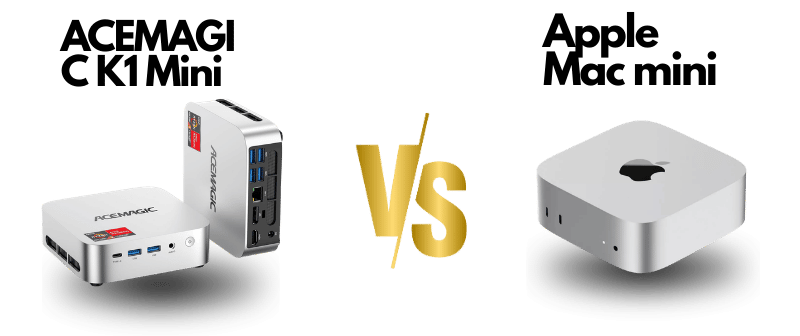
Apple Mac mini (2024) vs ACEMAGIC K1 Mini PC

Two small boxes. Two completely different ambitions.

Mini PCs stopped being novelties a long time ago. Today they sit on desks in design studios, home offices, and server racks — doing real work. But the gap between the machines in this category has never been wider. One is Apple’s most refined compact desktop yet, built on silicon that rewrites the performance rules. The other is a Windows workhorse that punches hard for the price and refuses to apologize for it.
The Apple Mac mini (M4, ~£599) outperforms the Acemagic K1 in single-core performance and power efficiency, but the Acemagic K1 (AMD Ryzen 9 7940HS, ~£350) offers more RAM flexibility, Windows 11, and better value for developers needing x86 compatibility. Choose Mac mini for macOS-dependent workflows; choose Acemagic K1 for Windows/Linux development.
If you’re trying to decide between them, here’s what actually matters.
1️⃣ Design & Build
Apple Mac mini (2024)
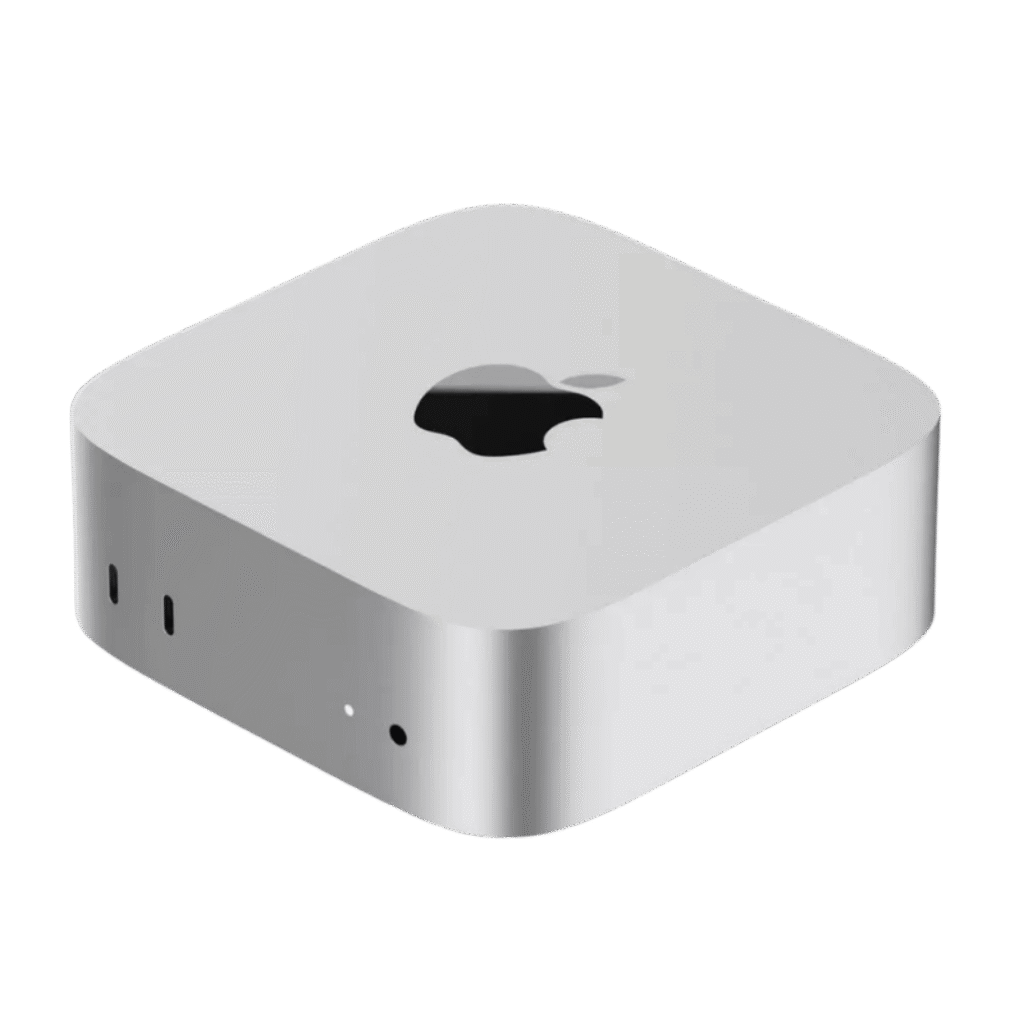
- Ultra-compact 5 × 5-inch aluminum chassis
- Redesigned internals around M4 silicon efficiency
- Front-accessible USB-C for daily convenience
- Carbon neutral manufacturing
- Disappears on your desk — in the best way
The Mac mini doesn’t try to impress you with its looks. It impresses you by being so small and so quiet that you stop thinking about your hardware and start thinking about your work.
ACEMAGIC K1
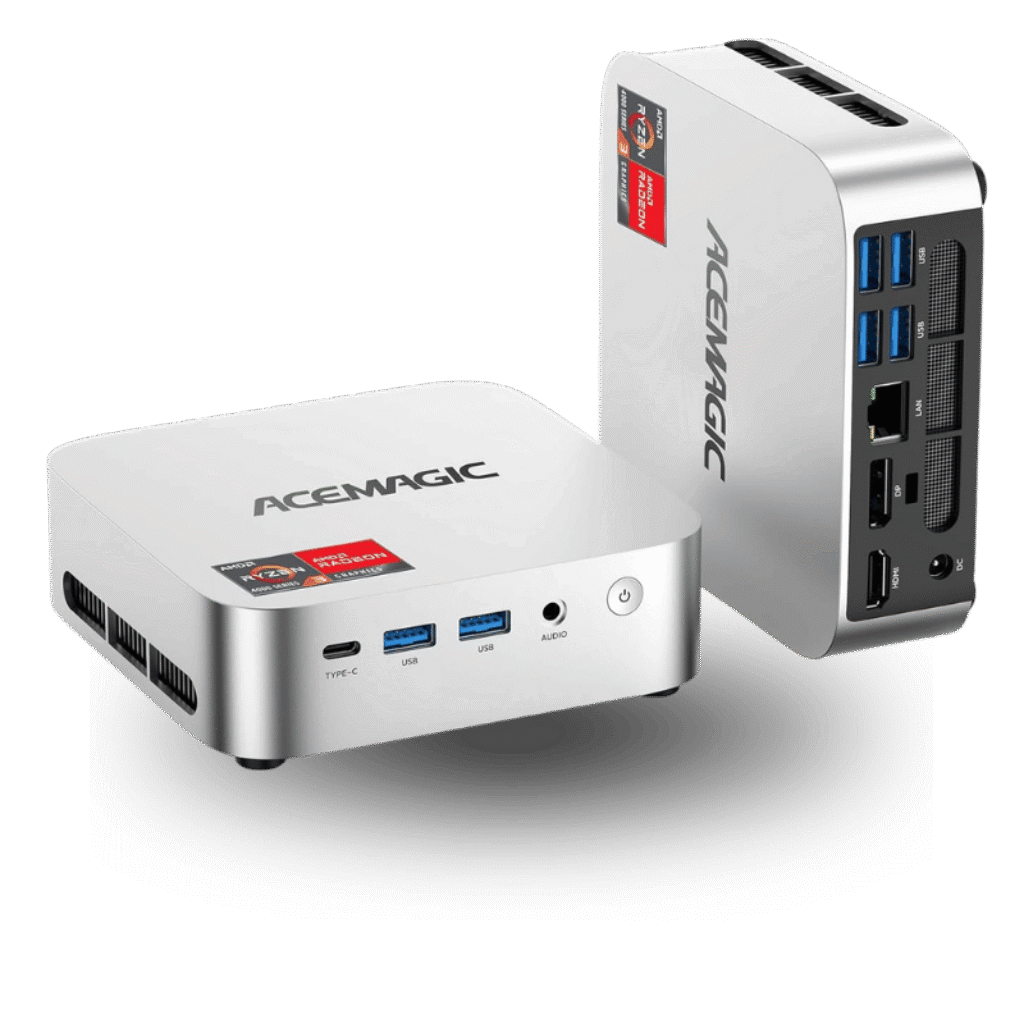
- 5.04 × 5.04 × 1.61-inch compact build
- Plastic/metal hybrid chassis
- VESA mount included — attaches directly to your monitor
- Multiple rear I/O ports, accessible at a glance
The K1 is thicker, plainer, and entirely unbothered by that. It’s built to be useful, not beautiful. The included VESA mount is a practical win that Apple doesn’t offer.
Verdict: Mac mini takes the premium design crown. ACEMAGIC K1 wins on mounting flexibility and desk-free installation.
2️⃣ Performance
Mac mini — Apple M4 Chip
- 10-core CPU / 10-core GPU
- 16GB unified memory (shared intelligently between CPU and GPU)
- Apple Intelligence on-device AI processing
- Exceptional energy efficiency under sustained load
- Built for creative, technical, and multitasking workloads
The M4 isn’t just faster than what came before it — it operates differently. Unified memory means data moves without the latency penalties of traditional architectures. Whether you’re cutting 4K footage, running a local AI model, or juggling 40 browser tabs with Photoshop open, the Mac mini doesn’t flinch.
ACEMAGIC K1 — AMD Ryzen 4300U
- 4-core / 4-thread processor, up to 3.7GHz
- AMD Radeon integrated graphics
- 8GB DDR4 (expandable to 64GB)
- Handles office tasks, streaming, light editing, casual multitasking
The Ryzen 4300U is a capable older-generation mobile chip. For the workloads most people actually do — emails, documents, video calls, web browsing — it’s more than adequate. For demanding creative work or sustained performance under pressure, it shows its limits.
Verdict: Mac mini is in a different performance class entirely. The K1 is sufficient for everyday computing — just don’t push it into professional territory.
3️⃣ Memory & Storage
| Feature | Mac mini (2024) | ACEMAGIC K1 |
|---|---|---|
| RAM | 16GB Unified Memory | 8GB DDR4 (up to 64GB) |
| Storage | 256GB SSD | 256GB SSD (up to 4TB) |
| Upgradeable? | ❌ No | ✅ Yes |
Apple’s unified memory architecture is technically faster — the CPU and GPU share the same high-bandwidth pool. The tradeoff is that what you buy is what you keep forever.
ACEMAGIC goes the other direction: start small, grow as needed. Up to 64GB RAM and 4TB storage means the K1 can evolve with your workload without buying a new machine.
Verdict: Mac mini = superior memory speed. K1 = genuine upgrade freedom.

 Amazon.com
 4️⃣ Connectivity & Ports
Mac mini (2024)
- Thunderbolt ports (40Gbps transfer speeds)
- HDMI output
- Gigabit Ethernet
- Front-panel USB-C
- 3.5mm headphone jack with high-impedance headphone support
Thunderbolt changes what’s possible with a compact machine. External GPUs, professional displays running at full resolution, ultra-fast NVMe enclosures — all connected through a single cable type.
 Backtotheoffice.co.uk
  Alibaba.com
 ACEMAGIC K1
- HDMI 2.0
- DisplayPort 1.4
- USB-C 3.2
- Multiple USB 3.2 Type-A ports
- Gigabit Ethernet
- WiFi 5 + Bluetooth 4.2
- Triple 4K display support
The K1 offers more port variety out of the box and can drive three monitors simultaneously at 4K — a genuinely useful capability for productivity setups.
Verdict: Mac mini = Thunderbolt speed and ecosystem depth. K1 = wider port selection and multi-monitor flexibility at a lower price point.
5️⃣ Operating System & Ecosystem
Mac mini → macOS Sequoia
- Seamless continuity with iPhone and iPad
- iPhone Mirroring — control your phone from your Mac desktop
- Universal Clipboard across all Apple devices
- Apple Intelligence privacy-first AI features
- AirDrop, AirPlay, Handoff built into the OS at a deep level
If you live in Apple’s world already, the Mac mini makes that world feel seamless. The integration isn’t a feature — it’s the operating system.
ACEMAGIC K1 → Windows 11 Pro
- Familiar to the vast majority of office environments
- Full compatibility with enterprise software and legacy applications
- Works within any ecosystem — no lock-in
- Business-grade security features built in
Windows 11 Pro is the right call for anyone tied to specific software, corporate environments, or who simply knows and trusts the Windows workflow.
Verdict: Invested in Apple devices → Mac mini is a natural extension. Windows-first environment → K1 fits right in without friction.
6️⃣ Graphics & Display
Mac mini (M4 GPU)
- 10-core Apple GPU
- Hardware-accelerated media encoding and decoding
- ProRes video support
- Optimized for Final Cut Pro, Motion, and creative applications
ACEMAGIC K1 (AMD Radeon)
- Radeon integrated graphics up to 1400MHz
- Triple 4K display output (HDMI + DisplayPort + USB-C)
- Handles streaming, light gaming, and everyday media playback
The M4 GPU wins on raw power and creative application optimization. The K1 wins on display output quantity — three screens on a budget machine is a real advantage for productivity-focused users.
7️⃣ Price & Value
The Mac mini sits at a premium price point — and earns it through performance, software longevity, and resale value that few Windows machines can match.
The ACEMAGIC K1 costs significantly less and delivers respectable value for light-to-medium workloads. For users who don’t need M4-class performance, the savings are real and the capability is genuine.
The honest question isn’t “which is cheaper” — it’s “which one will you still be satisfied with in three years?”

 eBay
eBay  eBay
eBay  eBay
eBay Who Should Buy Each
Choose the Apple Mac mini (2024) if:
- You want the fastest compact desktop money can buy
- You’re already using iPhone, iPad, or other Apple devices
- You do creative work — video, design, photography, music
- You want a machine that stays fast and supported for years
- Efficiency and long-term value matter more than upfront cost
Choose the ACEMAGIC K1 if:
- You need a capable mini PC without a premium price tag
- Windows 11 Pro is non-negotiable for your workflow
- You want the freedom to upgrade RAM and storage over time
- Triple 4K display output is important to your setup
- Your daily tasks stay in the office productivity lane
The Bottom Line
These two machines aren’t really competing — they’re serving different people with different needs.
The Apple Mac mini (M4) is what happens when a company optimizes every layer of the stack — silicon, operating system, and ecosystem — for a single outcome: effortless, lasting performance. You pay for that cohesion, and it’s worth it if performance and integration are your priorities.
The ACEMAGIC K1 is the honest, practical choice. It won’t impress anyone on a spec sheet war against the M4, but for everyday computing, it delivers more than enough — at a price that leaves money in your pocket for everything else.
Performance and ecosystem first → Apple Mac mini. Budget, flexibility, and Windows first → ACEMAGIC K1.